Halal Stock Screener: How to Check Any Stock in 30 Seconds (Free)
By Akinda · 2026-05-14
Table of Contents
- Introduction
- Why You Need a Halal Stock Screener
- What Makes a Stock Halal? (Quick Primer)
- The 3-Step Screening Process Every Scholar Agrees On
- How to Screen Any Stock in 30 Seconds with Akinda
- Live Example: Screening NVIDIA (NVDA) Step-by-Step
- What to Do If a Stock Fails the Screen
- FAQ
Introduction
Checking whether a stock is halal used to mean reading annual reports, calculating debt ratios, and trusting whichever fatwa you found first. It doesn't anymore.
A good halal stock screener does the entire Shariah review for you - business activity, debt levels, interest income - in seconds. The challenge is knowing how to actually use one and what the numbers mean.
This article shows you exactly that. We'll use NVIDIA (NVDA) as a live example on Akinda's free screener, walk through every step of the screening process, and decode what each result actually tells you. By the end, you'll be able to check any stock in 30 seconds and know whether it belongs in your portfolio.
1. Why You Need a Halal Stock Screener
Most Muslim investors face the same problem. They want to invest, but they don't know which stocks are Shariah-compliant. So they either avoid the market entirely, or they buy based on a friend's recommendation and hope for the best.
Neither approach works. The S&P 500 alone has 500 companies. Globally, there are over 50,000 listed stocks. Manually checking each one would take hours per stock.
A halal stock screener does this work for you in seconds, applying the same Shariah criteria scholars use, running the numbers, and giving you a clear answer.
The good news: you don't need to pay for one. Akinda's screener is free and built on AAOIFI-aligned criteria - the standard used by most global Shariah indices.
2. What Makes a Stock Halal? (Quick Primer)
A stock is Shariah-compliant when the company behind it meets two conditions:
- Its core business is permissible - no alcohol, gambling, conventional banking, adult entertainment, or other prohibited activities.
- Its finances stay within Shariah limits - interest-bearing debt and non-compliant income must fall below specific thresholds.
That's the entire framework. Everything else is detail.
3. The 3-Step Screening Process Every Scholar Agrees On
Across AAOIFI, S&P Dow Jones Islamic, MSCI Islamic, and FTSE Shariah - the four major standards - three checks appear in every one:
Step 1 - Business activity check. Does the company make most of its money from halal activities? Non-compliant revenue must stay under 5% of total revenue.
Step 2 - Interest-bearing debt check. Is the company drowning in interest-based debt? Most standards cap this at roughly 30-33% of market cap or total assets.
Step 3 - Interest income check. How much does the company earn from interest-bearing investments? This also stays under the 30-33% range, and any interest income must be purified.
Pass all three → halal. Fail any one → non-compliant.
4. How to Screen Any Stock in 30 Seconds with Akinda
Here's the actual workflow:
- Open Akinda and type the ticker into the search bar.
- On the stock's page, look at the badge next to the company name - green "Halal" means it passes.
- Click the Shariah Report tab to see the full breakdown: business activity, interest-bearing securities, and interest-bearing debt.
- Check the Halal Rating out of 10 to gauge how cleanly the stock passes.
That's it. The screening, the math, the threshold checks - all done.
Let's walk through a real example.
5. Live Example: Screening NVIDIA (NVDA) Step-by-Step
NVIDIA is one of the most-discussed stocks of the decade - the company behind the chips powering the AI boom. It's also a useful example for halal screening because its revenue comes from several different business lines, and one of them raises a flag. Let's run it through Akinda.
Step 1: Open the stock page
Search NVDA in Akinda. The header shows:
- NVIDIA Corporation - NASDAQ NVDA (US)
- A green Halal badge right next to the company name
- Current price: $234.78
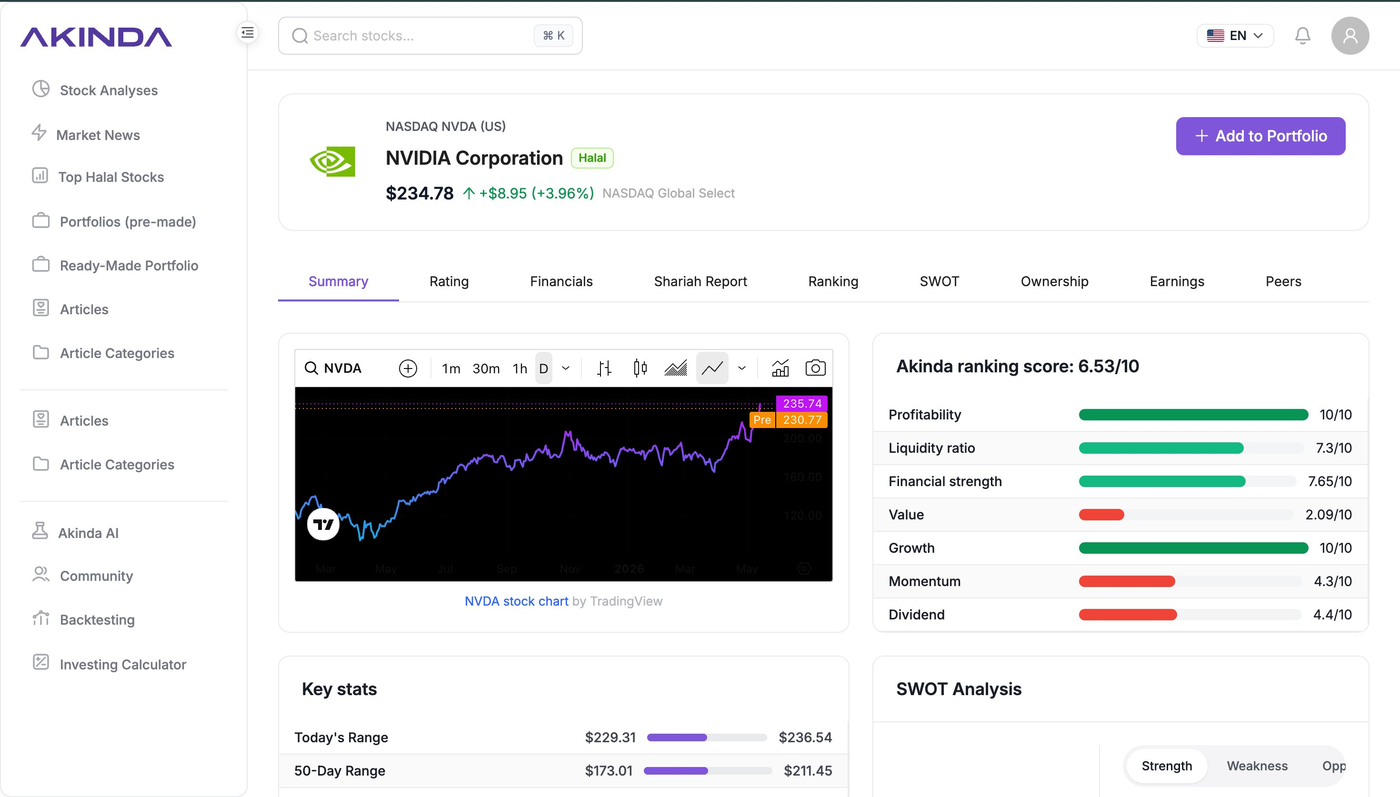
- NVIDIA's overview page on Akinda - the green Halal badge confirms it passes the screen.
The badge alone tells you NVIDIA passes Akinda's screen. But don't stop there, the details matter.
Step 2: Open the Shariah Report tab
This is where the real screening lives. Akinda's Shariah Report on NVIDIA shows:
- Halal Rating: 7/10
- Business Activity: Pass
- Interest-bearing securities and assets: Pass
- Interest-bearing debt: Pass
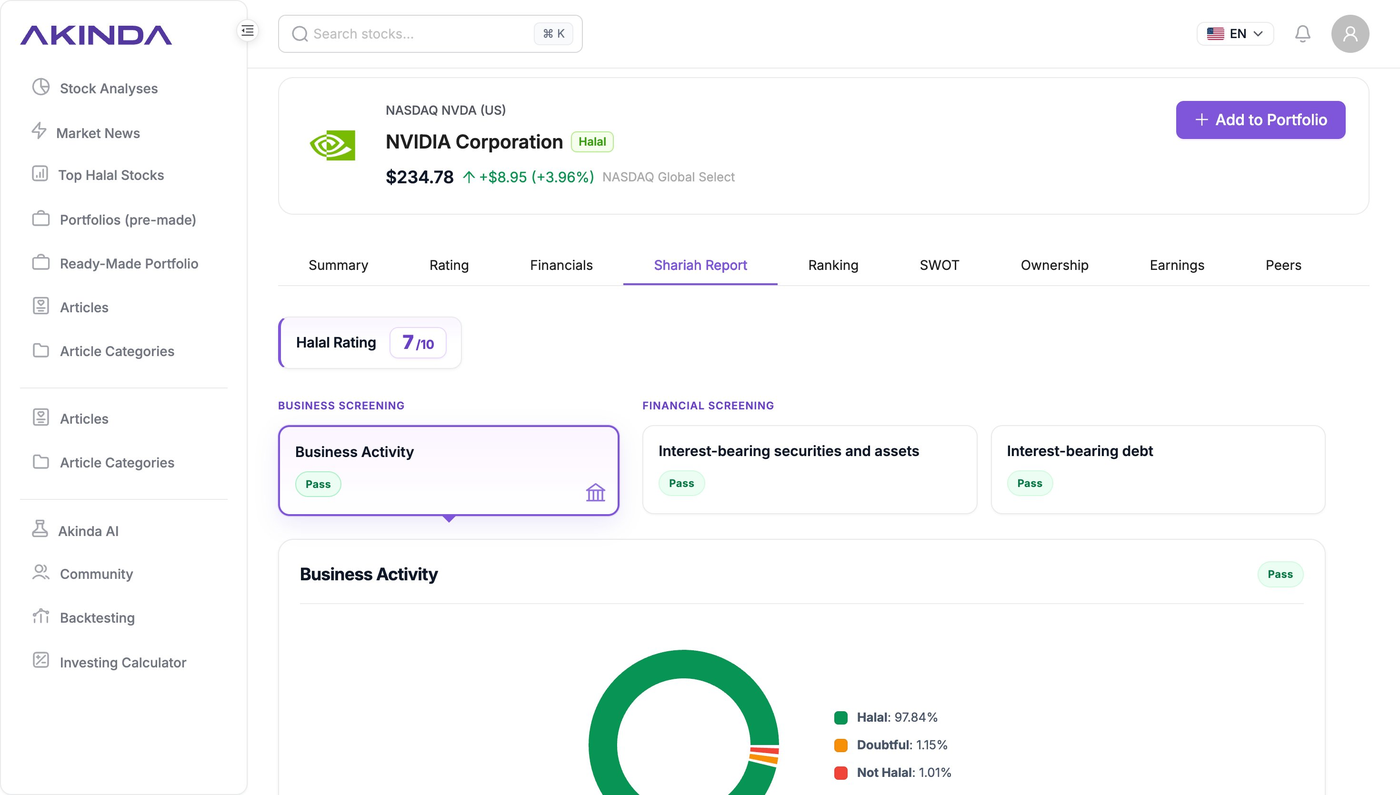
- All three Shariah screens pass - but the 7/10 rating tells you to look closer.
All three screens are green. But why a 7/10 rating instead of a perfect 10/10?
Scroll down and Akinda shows the answer. The business activity breakdown:
- Halal revenue: 97.84%
- Doubtful revenue: 1.15%
- Not Halal revenue: 1.01%
Combined, non-halal and doubtful revenue equals 2.16% - well under the 5% threshold required by AAOIFI standards. NVIDIA passes, but not perfectly.
This is exactly why the Halal Rating matters. A stock can pass the screen and still have room for improvement. A 10/10 means cleaner. A 7/10 means compliant but worth knowing about.
Step 3: Look at where the revenue actually comes from
This is where NVIDIA gets interesting. Most halal screeners stop at "pass/fail" and give you a percentage. Akinda shows you the actual business segments behind those numbers:
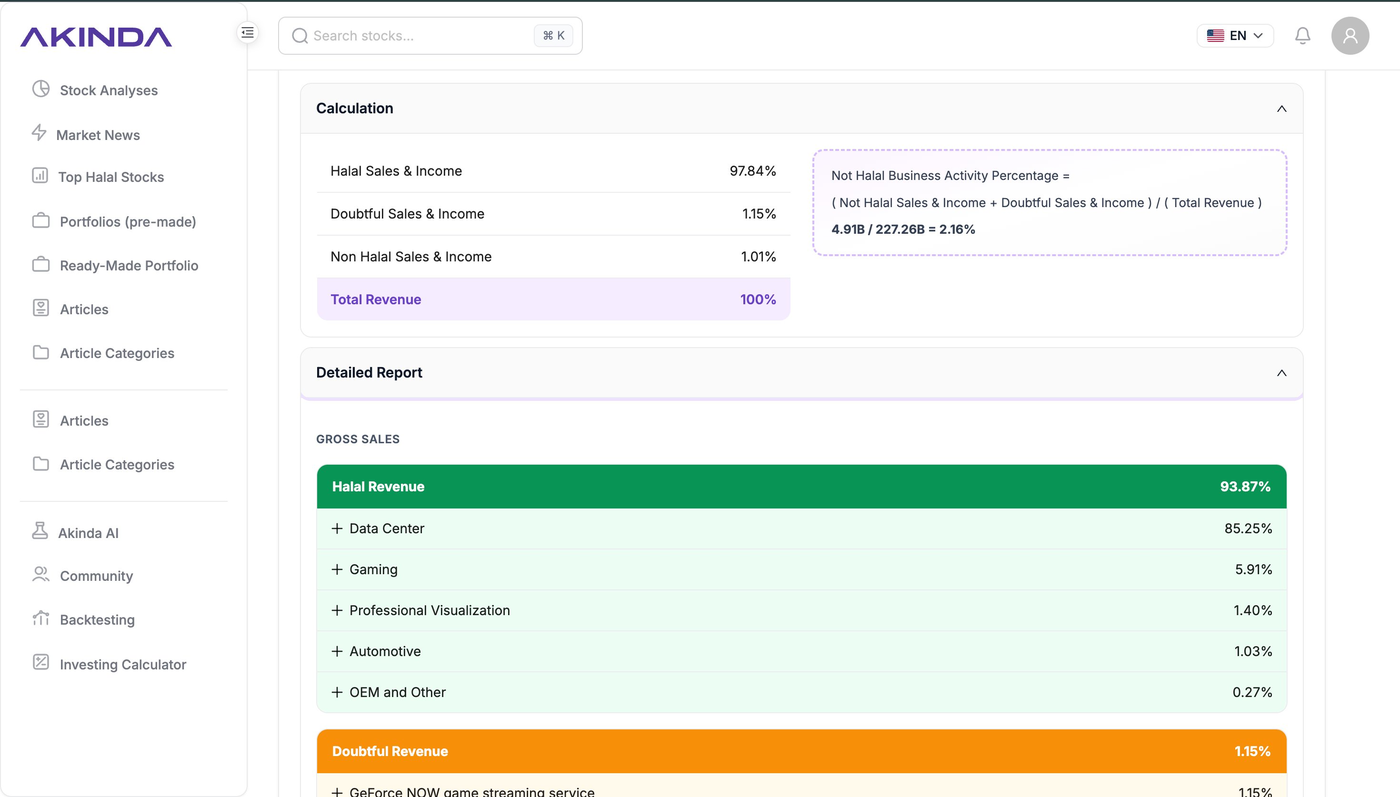
NVIDIA's revenue broken down by segment - Akinda shows you exactly what the company sells.
NVIDIA's Halal Revenue (93.87% of gross sales) breaks down as:
- Data Center: 85.25% - the AI chip business everyone talks about
- Gaming: 5.91% - GPUs sold to gamers
- Professional Visualization: 1.40% - design and engineering tools
- Automotive: 1.03% - chips for self-driving cars
- OEM and Other: 0.27%
The Doubtful Revenue (1.15%) comes from one specific source: GeForce NOW, NVIDIA's game streaming service. Scholars flag this because the platform can be used to stream games that contain content considered impermissible - gambling mechanics, violence, or otherwise. The service itself isn't haram, but a portion of its usage is considered doubtful.
This level of detail is what separates a real Shariah screen from a surface-level check. You don't just see a percentage, you see why.
Step 4: Check where the non-halal income comes from
Scroll down to the Other Income section to see the 1.01% Not Halal slice:
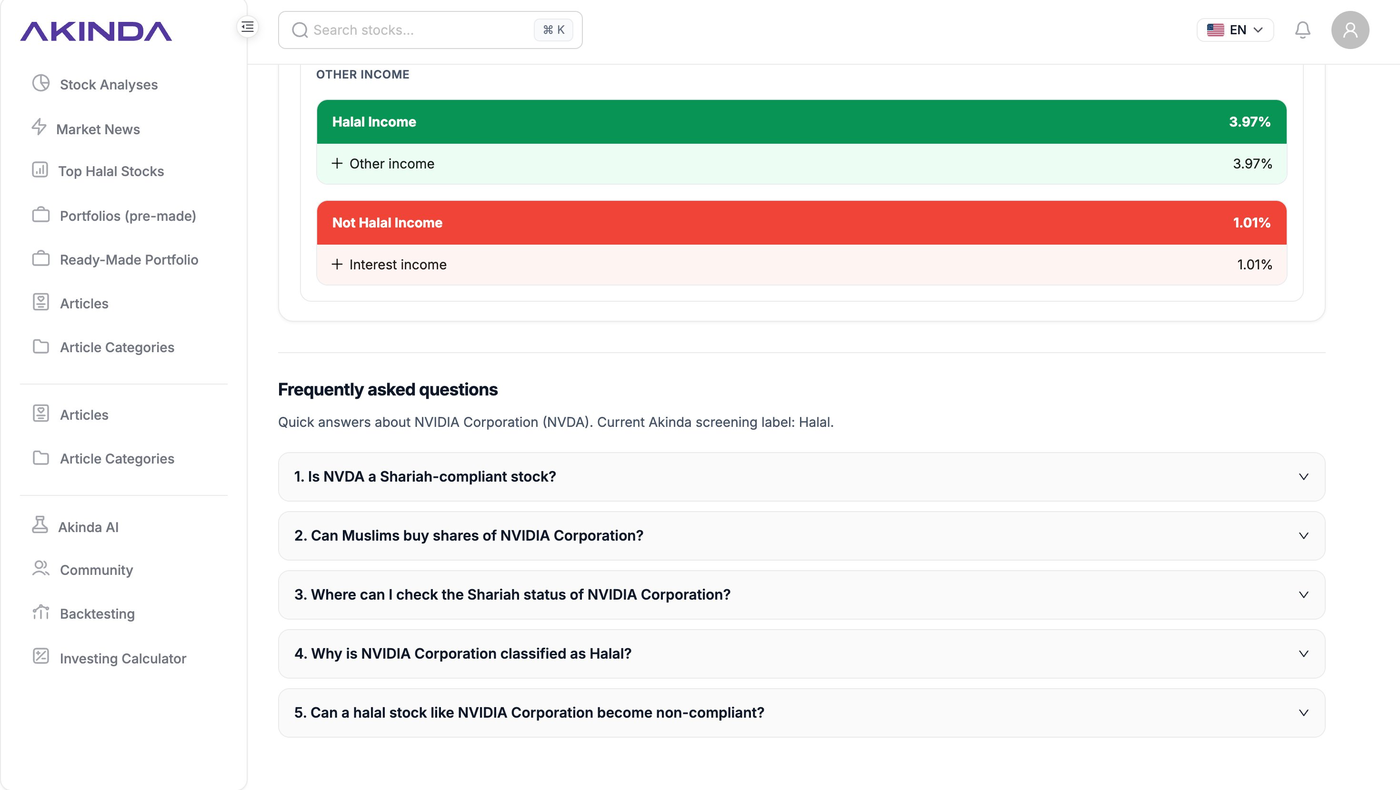
Akinda identifies interest income as the source of NVIDIA's non-halal revenue.
NVIDIA's Not Halal Income comes from interest income - the amount NVIDIA earns on its cash reserves sitting in interest-bearing accounts. This is the most common reason an otherwise-halal company picks up a small non-compliant slice.
Now check the Financials tab to see the underlying numbers. For FY 2026, NVIDIA reported:
- Revenue: $215.9 billion
- Interest Expense: $259 million
- Interest & Investment Income: $2.3 billion
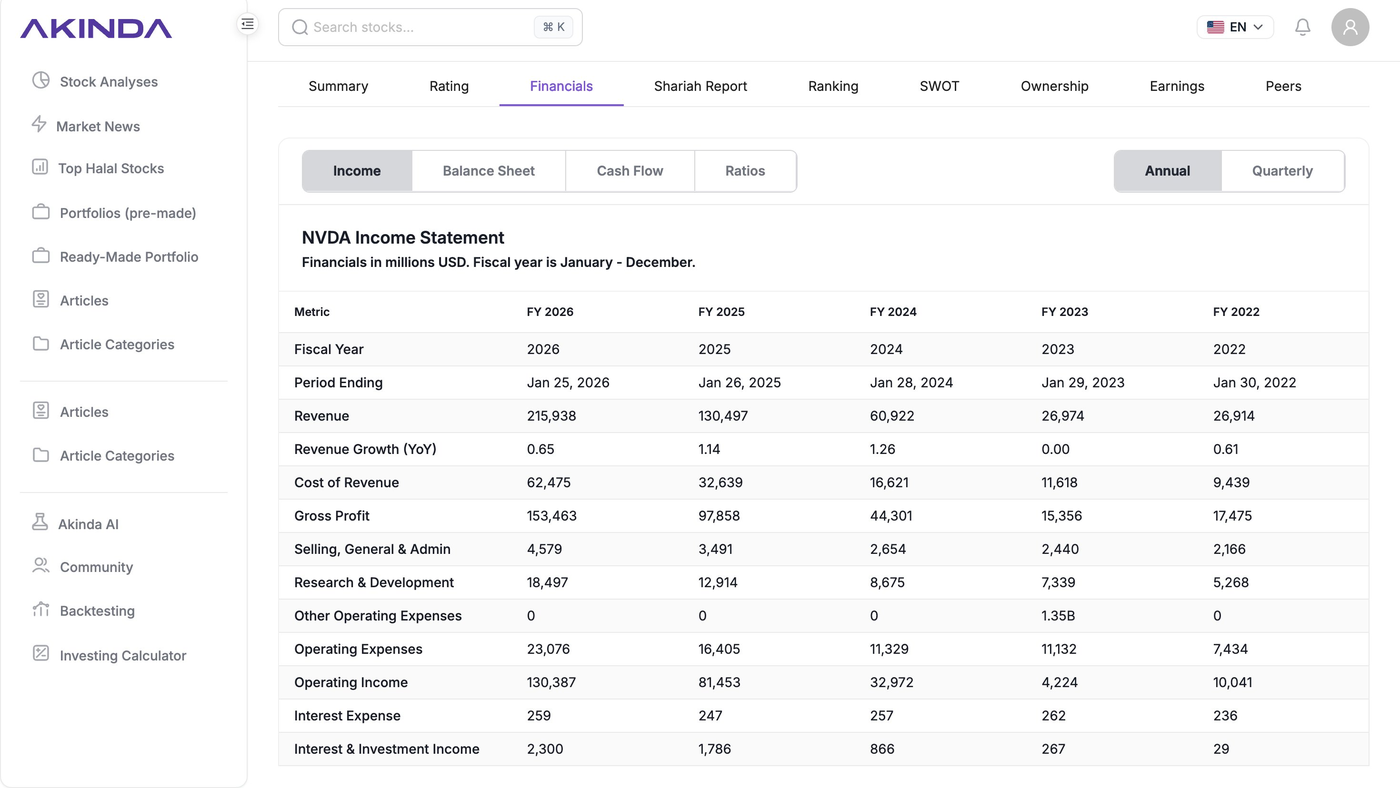
NVIDIA's income statement on Akinda - the interest income line is what shows up as non-halal revenue.
Scholars typically recommend that investors purify the equivalent percentage of any dividends or capital gains they receive, donating it to charity rather than keeping it.
Step 5: Decide
In about 30 seconds, you now know:
- NVIDIA is Shariah-compliant under AAOIFI-aligned criteria
- It passes all three screens (business, debt, interest income)
- Its Halal Rating is 7/10 - compliant, with a small purification obligation
- The non-halal sources are GeForce NOW streaming (1.15%) and interest income (1.01%)
- Roughly 2.16% of any returns should be purified
That's a complete halal screen. No spreadsheets, no annual reports, no guessing.
6. What to Do If a Stock Fails the Screen
Not every stock passes. If you see a red "Non-Compliant" badge, you have three options:
- Move on. The simplest choice. There are thousands of halal-screened stocks; you don't need this one.
- Check why it failed. Sometimes a company fails because of one specific issue - say, debt slightly above the threshold. If that's likely to change soon, you might monitor it.
- Look for halal alternatives in the same sector. If Tesla had failed, Akinda's screener would help you find compliant peers in the auto or clean energy space.
The point of screening isn't to find a way to justify a stock you like. It's to filter out the ones that don't align with your values, fast.
7. FAQ
- How accurate is a free halal stock screener?
- Akinda uses AAOIFI-aligned screening criteria - the same standard adopted by major global Shariah indices. The screening logic is identical to what paid institutional tools use. The difference is that paid platforms often add features like portfolio purification calculators or advisor access, not better screening.
- Why do different screeners sometimes give different results?
- Because they use different thresholds. AAOIFI uses one set, S&P Dow Jones Islamic uses another, MSCI Islamic uses a third. A stock can pass one screen and fail another by a few percentage points. Always check which standard your screener uses.
- Do I need to re-screen a stock I already own?
- Yes - at least once or twice a year. Companies take on new debt, change their revenue mix, or enter new business lines. A halal stock today might not be halal next year. Akinda makes this easy because the screen updates automatically with each new financial report.
- Is purification still required if a stock passes the screen?
- If any portion of revenue comes from non-compliant sources (even under the 5% limit), the equivalent percentage of your returns should be purified - given to charity without claiming a tax benefit. The Tesla example above shows roughly 2.16% would need to be purified.
- Can I screen non-US stocks?
- Yes. Akinda covers thousands of stocks across major global exchanges, not just US-listed ones.
You may also like
- What Is Halal Investing? The Complete Beginner's Guide (2026)
How to start halal investing from 0 in 2026 - Is Trading Halal? A Beginner's Guide to Halal Trading
Akinda Features Explained: How to Use the Platform for Halal Investing
Download the Akinda app and screen stocks instantly for free
🌐 Website: https://akinda.io
📱 App: https://onelink.to/kpqkh6